Database model
Kadena blockchain nodes store information in two different data stores. On each Chainweb node, there's a RocksDB key-value store that keeps track of information about the peer network, chains, and blocks. Each node also hosts a set of SQLite database files that store information about Pact smart contracts and transaction results with one file for each chain in the network.
The following diagram presents a simplified view of this separation of concerns.
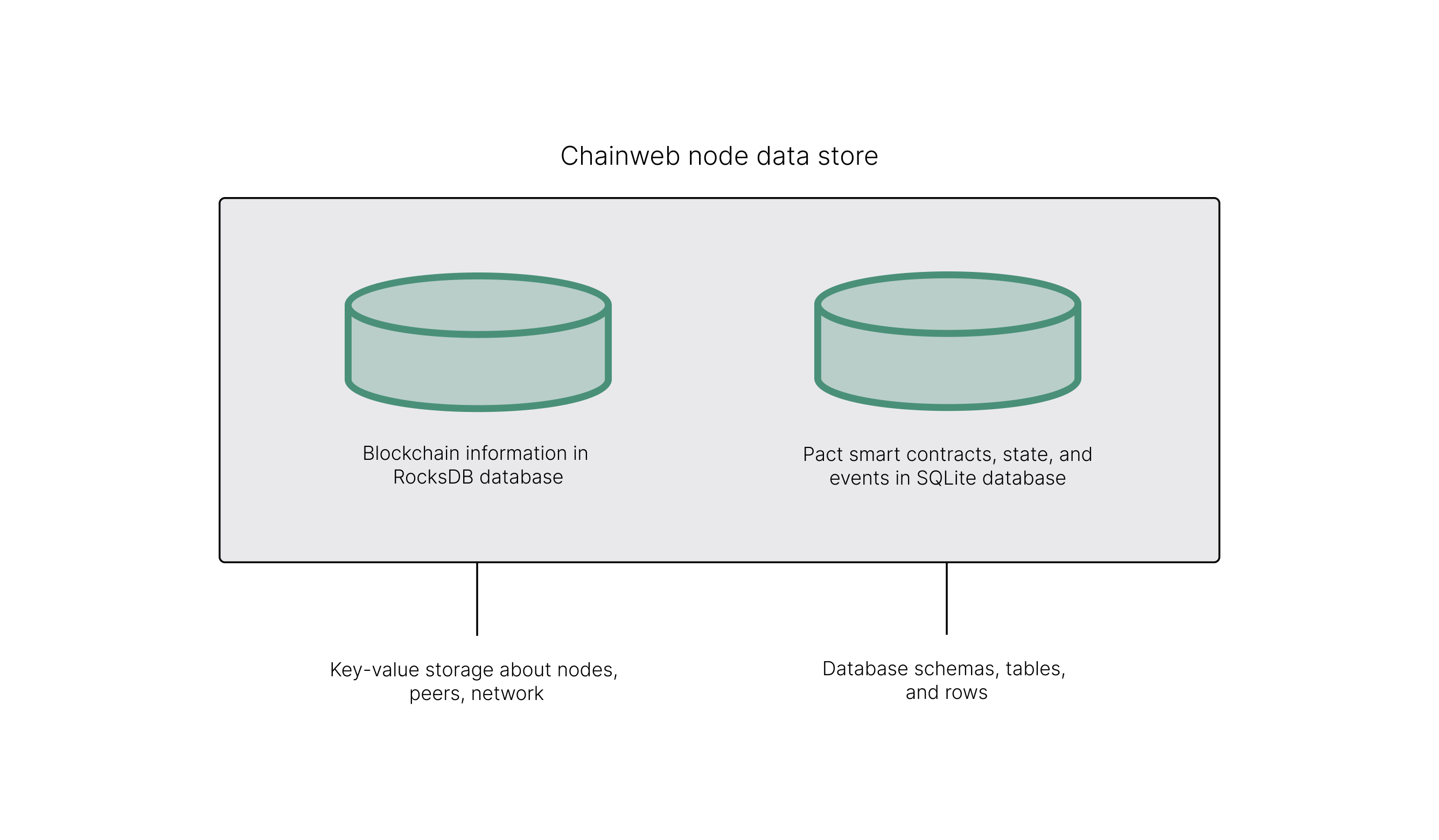
As a smart contract developer, you're primarily interested in writing to and reading from the Pact state, but it's helpful to know how data is organized and optimized for different execution modes and to perform different tasks. The RocksDb database—sometimes referred to as the chain database—is optimized for efficient network communication and resiliency. Pact database operations are optimized for transaction performance.
Working with Pact tables
Tables are a core component of Pact smart contracts because they enable you to store, manipulate, and read data using familiar patterns. Interacting with Pact databases is much like interacting with any other type of database, but with constraints that reflect the unique requirements of blockchain execution. For example, working with Pact databases is similar to working with other SQL-based databases, with similar database operations. There are built-in functions to insert, read, and update values stored in tables.
| Function type | Description |
|---|---|
| Insert | Insert new rows into a table. |
| Read | Read values from a table. |
| Update | Update values for a column that contains data in a table. |
| Write | Write values for a column in a table, regardless of whether the column contains data or not. |
| Delete | Not available in Pact. |
If you've worked with other databases or programming languages, you should be familiar with similar functions that enable you to create, read, update, and delete (CRUD) information.
However, in Pact, you use the insert function in place of the create functionality to add rows to a table and there isn't a function to delete rows from a table.
Although Pact doesn't provide a delete function, you can use an active column in tables to mark table rows as active or inactive.
For more information about using an active column to indicate active and inactive rows, see Identifying active and inactive rows.
Data access model
Most smart contracts use one or more tables to store all of the information required for the application or service that the smart contract provides. You access the information stored in Pact tables by using the table's key-row structure. This access model is similar to using a primary key to access table data in other relational databases.
With the Pact key-row model, you access a row of column values by using a single key.
As a result of this access model, Pact doesn't support joining tables in a way that an online analytical processing database would support if populated from data exported from the Pact database.
However, Pact can record transactions using relational techniques.
For example, if you have a Customer table with keys used in a Sales table, a Pact smart contract could include code to look up the Customer record before writing to the Sales table.
Null values aren't allowed
The Pact database model doesn't support NULL values as a safety feature to ensure totality for transactions and to avoid unsafe control-flow for handling null values. The main function for working with database results is the with-read function. This function will return an error if any column value it attempts to read isn't found. To prevent transactions from failing with these errors, you should ensure that there are values in the columns you attempt to read in a transaction.
Versioned history
The key-row model is augmented by every change to column values being versioned by a transaction identifier.
For example, if you have a table with columns for name, age, and role, you might update the name column in a transaction with the identifier 100, and later update the age and role columns in a transaction identified as 102.
If you retrieve historical data for the table, only the change to the name column is returned for transaction identifier 100 and only the change to age and role columns are returned for transaction 102.
Table creation
Tables are defined by schemas in module declarations. The schema defines the table columns, field values, and field types. The module declaration also specifies the table name to associate with each schema you define. There's no restriction on the number of tables you can create.
The tables specified in the module declaration are created after the module declaration, and the table name is prepended with the module name, so that the module becomes the table owner.
It’s important to note this distinction between when tables are defined and when tables are created. You define table schemas, the table associated with each schema, and the functions that insert, read, and modify database records inside of module code. You create the tables outside of module code. The module acts as a guard to protect access to database functions and database records. This separation also allows module code to be updated without necessarily recreating the table in Pact state.
Table schemas
Before you create a table in Pact, you must define its schema. The schema describes the structure of the table by specifying the columns and data types for the values to be stored in the table. Schemas are defined within the Pact module declarations by using the defschema keyword and consist of a series of field names and field types.
Each field name specifies a column in the table, and each field type specifies the type of data held in that field.
In the following example, the accounts table has three columns with the field names balance, amount, and currency:
| Field name | Field type |
|---|---|
| balance | decimal |
| amount | decimal |
| currency | string |
In this example, the balance and amount columns require decimal as the data type and the currency column requires data to be a string value.
You can create the schema for this table in Pact like this:
(defschema accounts
  "Schema for accounts table."
  balance:decimal
  amount:decimal
  currency:string
)
All table schemas you create look similar to this example, but with different field names and data types. Field names must start with a valid alphabetic character, but can contain alphabetic, numeric, and special characters. In general, you should use field names that are short but recognizable. For each field, the field type must be one the data types that Pact supports.
Types that are declared in code are enforced at runtime when expressions are evaluated. For tables, any write to a table is type-checked against the table schema to ensure the data matches the expected type. Execution fails if type checking fails.
For information about the data types that Pact supports, see Data types.
Table definition
In Pact, tables are defined inside of the module declaration by using the deftable keyword.
The table definition accomplishes two goals:
- It associates a table name with a specific table schema of columns and data types.
- It defines the table inside of the module namespace.
There's no limit to the number of tables you can define in a module. Because the table is defined inside of a module, direct access to the table using database functions is only authorized for the module owner, that is, its administrative keyset or governance capability. However, module functions have unrestricted access to the table by default. With this default behavior, the module acts as the main entry point for all user interaction. You can restrict access to tables inside of the module by using row-level keysets and enforcing the keyset guard for specific functions.
The following example illustrates using the deftable keyword to define an accounts-table table that uses the accounts schema:
(deftable accounts-table:{accounts})
Notice that the table and schema are represented as a pair, separated by a colon (:).
The curly braces ({ }) around the schema name are there because the schema is an object.
The schema name and table name must be different from one another. In general, you should use table and schema names that are similar to each other or follow a consistent convention to avoid confusion: For example:
(deftable cat-table:{cats})
(deftable asset-tracker:{assets})
Create module tables
After you have defined all of the tables for your module inside of the module declaration, you can create those tables outside of the module. Creating the table outside of the module ensures that other parts of the module logic can be redefined or updated without recreating the table.
You can created tables after the module declaration by using the create-table function followed by the table name as it's defined in the module declaration. For example:
(create-table accounts-table)
(create-table cat-table)
(create-table asset-tracker)
Insert
You can use the insert function to add new data to a table.
You can use insert function to add any type of new artifact with a key value.
For example, you can use a key value to add a row of data about accounts, customers, loans, or assets.
The following example illustrates adding a row to the accounts-table using the insert function with the key value
"account-1".
(insert accounts-table “account-1” { "balance": 12.3, "amount": 0.0, "currency":"USD"})
Note that the key must be a string value.
This example adds the following row to the accounts-table:
| key | balance | amount | currency |
|---|---|---|---|
| account-1 | 12.3 | 0.0 | USD |
You can also use the insert function inside of another function to add new data to rows in a table from the input values for the function.
For example:
(defun create-account (id balance amount currency)
  (insert accounts-table id
       { "balance": balance,
         "amount" : amount,
         "currency": currency })
)
In this example, the row inserted into the accounts-table takes the values entered for the create-account function.
Read
You can use the read function to read a row of data from a specified table for a specified key value.
In the following example, the accounts-table has two rows of data storing the account balance and currency for account-1 and account-2:
| key | balance | currency |
|---|---|---|
| account-1 | 4.00 | USD |
| account-2 | 3.00 | USD |
You can use the read function to retrieve the information for the key value.
For example, you can get the balance and currency information for account-1 like this:
(read accounts-table account-1 ['balance 'ccy])
You can also use the read function inside of another function like this.
(defun read-accounts (1)
  (read accounts id [‘balance ‘ccy])
)
In each example, the read functions returns the following values:
| balance | currency |
|---|---|
| 4.00 | USD |
Update
You can use the update function to update one or more values in an existing row of a table. Updates enable you to change the status of a column or amend the initial dataset to record a new value.
With the update function, you specify the key for the row you want to update, the field you want to update, and the new value for the field in that that row.
In most cases, you use update functions in other functions to allow users to input new values.
(update table-name id {"field": new-value})
The following example illustrates updating the status field for an asset in the assets-table.
Before updating the assetPrice, the assets-table has the following fields and values.
| assetID | assetName | assetPrice | status |
|---|---|---|---|
| asset-1 | My Asset | 5.0 | todo |
For this example, the asset-update function updates the status column, then reads the value of the updated column.
(defun asset-update (assetId:string new-status:string)
  (update assets-table assetId {
    "status": new-status
  })
  (read asset-table assetId)
)
Select
You can use the select function to select values from one or more rows in a table.
The select function is similar to the read function except that the read function retrieves information for a single key-row value.
The select function enables you to retrieve multiple rows from a table based on the criteria you provide.
Because you can specify other criteria and not just a single key-row value, the select function provides you with more flexibility in what information you choose to return.
The syntax for the Pact select function is similar to the syntax for standard SQL SELECT statements.
In its simplest form, the select statement retrieves all values from a specified table.
In the following example, the select statement is used in a select-assets function to return all values from the assets-table:
  (defun select-assets ()
    (select assets-table (constantly true))
  )
This query returns all of the values currently stored in the assets-table fields.
For example:
| assetId | assetName | assetPrice | status |
|---|---|---|---|
| asset-1 | My Asset | 5.0 | todo |
| asset-2 | Asset 2 | 6.0 | in progress |
| asset-3 | Asset 3 | 7.0 | done |
Like standard SQL SELECT statements, you can use a where clause to refine your results.
For example, you can return only the assetName and assetPrice for a specific asset name like this:
(select assets-table ['assetName,'assetPrice] (where 'assetName (= "Asset 2")))
This query returns the following values from the sample assets-table:
| assetName | assetPrice |
|---|---|
| Asset 2 | 6.0 |
You can also specify operators—such as greater than (>) or less than (<)—from within the where clause.
For example:
(select assets-table (where 'assetPrice (> 6.0)))
This query returns the following values from the sample assets-table:
| key | assetName | assetPrice | status |
|---|---|---|---|
| asset-3 | Asset 3 | 7.0 | done |
Select queries and performance
You should note that when you write queries using the Pact select function, the select and where operations provide a streaming interface that applies filters to the specified table, then operates on the row set as a list data structure using sort and other functions.
Because of the computational overhead, you should avoid using select statements to work with on-chain data.
Although it can be convenient to use select statements to retrieve data, you can often return the same results more efficiently using other functions.
For example, the following query selects Programmers with salaries >= 90000 and sorts by age in descending order:
(reverse (sort ['age]
  (select 'employees ['first-name,'last-name,'age]
    (and? (where 'title (= "Programmer"))
          (where 'salary (<= 90000))))))
You can write the same query using the filter function and sorting the resulting list like this:
(reverse (sort ['age]
  (filter (and? (where 'title (= "Programmer"))
                (where 'salary (< 90000)))
          employees))
)
For performance reasons, Pact database interactions are optimized for single-row reads and writes.
Queries that use the select statement to scan multiple rows in a table can be slow and prohibitively expensive computationally.
Therefore, the best practice is to use select statements in local, non-transactional operations and to avoid using select on large tables in functions that perform transactional operations.
Transactional and local execution
Pact doesn't distinguish between transactional and local execution.
However, transactions typically involve business events that must be executed and recorded in a timely fashion.
Queries rarely represent a business event, and can often involve data payloads that could impact performance.
The best practice is to query data locally on a node by using the /local endpoint.
You can also query historical data using the /local endpoint and a transaction identifier as a point of reference.
For transactions, you should use the /send endpoint.
For more information about transaction execution, see Transaction lifecycle. For more information about Pact endpoints, see Pact API.
Keys
You can use the keys function from within a module to return all of the key values in a table.
For example, you can return the key values for the sample assets-table with the following code:
(module asset-manager ADMIN
  (defcap ADMIN () true)

  (defschema assets
     assetId:string
     assetName:string
     assetPrice:decimal
     status:string
  )

  (deftable assets-table:{assets})
  ...

  (keys assets-table)
)
You can also use the keys function within another function.
For example:
  (defun get-keys (table-name)
    (keys table-name)
  )
Row-level keysets
Keysets can be stored as a column value in a row, allowing for row-level authorization. The following code indicates how this might be achieved:
(defun create-account (id)
  (insert accounts-table id { "balance": 0.0, "keyset": (read-keyset "owner-keyset") }))

(defun read-balance (id)
  (with-read accounts-table id { "balance":= bal, "keyset":= ks }
    (enforce-keyset ks)
    (format "Your balance is {}" [bal])))
In this example, the create-account function reads the owner-keyset definition from the message payload using read-keyset, then stores it in the keyset column in the accounts-table table.
The read-balance function only allows the owner-keyset to read the balance by first enforcing the keyset using enforce-keyset function.
Changing a table schema
As noted in Create module tables, you can update contract functions without updating or recreating database tables. However, you can't modify the table schema when you update a contract. In general, Pact doesn't support database migration or schema and table upgrades. To update a database, you must declare new tables and define any data migration functions as part of a module load step for the new module that contains the modified table schema.
To update a table schema:
- Create a new module and declare the new table schema.
- Add functions to read rows from the old table and write them to the new table.
- Deploy the updated module with the new table schema on the network.
The original table and database state remain unchanged on the blockchain, but won't receive any new information after you deploy the new module.
Identifying active and inactive rows
Pact doesn't provide a delete function because of the potential issues with performance, data integrity, and data migration that row-level delete operations can introduce. In addition, being able to delete rows or tables violates one of the most important properties of a blockchain environment: that it provides an immutable record of state.
Because deleting information from tables could also cause problems for replaying transactions or synchronizing nodes and leave the chain in an unhealthy state, Pact doesn't support deleting rows or tables.
However, you can use an active column in tables to identify active table rows on insert, then later flag rows with obsolete information as inactive.
Inactive rows remain in the database, but you can write logic to prevent them from being updated or retrieved.
For example, you might define the user schema and users-table like this:
   (defschema user
       nickname:string
       keyset:guard
       active:bool
   )

   (deftable users-table:{user})
To add new users to the table, you might define a create-user function similar to the following:
   (defun create-user (id:string nickname:string keyset:guard active:bool)
      (enforce-keyset "free.operate-admin")
      (insert users-table id {
          "keyset": keyset,
          "nickname": nickname,
          "active": true
        }
      )
    )
You can then define a separate function to identify rows—using the id key-row—that are no longer active similar to the following:
    (defun tombstone:string (id:string)
       "Mark the specified row as inactive"
       (update users-table id { "active" : false })
    )
You can then check whether the active column is true or false for a specific row before allowing the row to be updated with code similar to the following:
   (defun change-nickname (id:string new-name:string)
      (with-read users-table id {"active" := active}
        (if (= active true)
          (update users-table id { "nickname": new-name })
          (format "Update NOT ALLOWED for user {}" [id])))
    )
For example, you can set the active column to false for the row identified by tai with a call similar to this:
(tombstone "tai")
"Write succeeded"
If you then attempt to update the nickname column for the tai row, you'll see the message that the change isn't allowed:
(change-nickname "tai" "INACTIVE USER Tai's Nickname")
"Update NOT ALLOWED for user tai"