Add vote management
In the previous tutorial, you built and deployed an election module on the local development network.
You then connected the frontend built with the @kadena/client library to the development network backend.
After connecting the frontend to the development network backend, you were able to view the candidate you added to the candidates database table.
In this tutorial, you'll update the election module to allow anyone with a Kadena single-key account to cast a vote on a candidate.
After you update the backend functionality, you'll modify the vote functionality for the frontend to use the development network.
After making these changes, Kadena account holders can vote using the election module and have their votes recorded on the blockchain, ensuring the security and transparency of the election process.
Before you begin
Before you start this tutorial, verify the following basic requirements:
- You have an internet connection and a web browser installed on your local computer.
- You have a code editor, such as Visual Studio Code, access to an interactive terminal shell, and are generally familiar with using command-line programs.
- You have cloned the voting-dapp repository to create your project directory as described in Prepare your workspace.
- You have the development network running in a Docker container as described in Start a local blockchain.
- You are connected to the development network using your local host IP address and port number 8080.
- You have created and funded an administrative account as described in Add an administrator account.
- You have created a principal namespace on the development network as described in Define a namespace.
- You have defined the keyset that controls your namespace using the administrative account as described in Define keysets.
- You have created an election Pact module and deployed it as described in Write a smart contract and updated its functionality as described in Nominate candidates.
Organize tests in REPL files
So far, you have added all of your tests for the election module to the election-workshop/pact/election.repl file.
While this is convenient if you have a small number of tests, continuing to add tests to a single file will make testing more complex and more difficult to follow.
To keep tests more organized, you can split them into multiple .repl files and reuse the code by loading one file into the other.
To organize tests into separate files:
-
Open the
election-workshop/pactfolder in the code editor on your computer. -
Rename
election.repltocandidates.repl. -
Create a new
setup.replfile in thepactfolder. -
Move the code before
(begin-tx "Load election module")from thecandidates.replinto thesetup.replfile. -
Create a new
voting.replfile in thepactfolder and add the following as the first line in the file:(load "setup.repl") -
Open the
candidates.replfile and add the following as the first line in the file:(load "setup.repl") -
Verify tests in the
candidates.replfile still pass by running the following command:pact candidates.repl --trace -
Verify that
voting.replloads successfully by running the following command:pact voting.repl --trace
Implement and test a vote function
When an account holder clicks Vote Now in the election application, it triggers a call to the vote function in the frontend/src/repositories/vote/DevnetVoteRepository.ts file, passing the current account name and the name of the candidate corresponding to the table row that was clicked.
The vote function in the frontend uses the Kadena client to execute the vote function defined in the election module.
To implement the vote function in the election Pact module, you can test your code as you go using the Pact REPL as you did in previous tutorials.
Test incrementing votes
Based on the work you did in the previous tutorial, the election application website displays a table of the candidates you have added.
Each candidate starts with zero (0) votes.
Each row in the table has a Vote Now button.
If you click Vote Now, the number of votes displayed in corresponding row should be increased by one.
The table is rendered based on the result of a call to the list-candidates function of the election Pact module.
So, in the Pact REPL you can test the behavior of the new vote function against the return value of list-candidates.
To test incrementing votes for a candidate:
-
Open the
election-workshop/pact/election.pactfile in your code editor. -
Define the
votefunction after theadd-candidatefunction with the following lines of code:(defun vote (candidateKey:string)
(with-read candidates candidateKey
{ "name" := name, "votes" := numberOfVotes }
(update candidates candidateKey { "votes": (+ numberOfVotes 1) })
)
)In this code:
- The
votefunction takes one argument—candidateKey—with a type of string. - The
candidateKeyspecifies the key for the row in thecandidatestable to read using thewith-readbuilt-in function. - The database column named
"votes"is assigned a value from thenumberOfVotesvariable.
The
votefunction then calls theupdatebuilt-in function with three arguments to specify:- The table to update (
candidates). - The key for the row to update (
candidateKey). - An object with the column names to update and the new value for the respective columns.
In this case, the
votefunction only updates thevotescolumn. The new value is the current number of votes that was obtained fromwith-readand stored in thenumberOfVotesvariable incremented by one ((+ numberOfVotes 1)).
- The
-
Open the
election-workshop/pact/voting.replfile in the code editor. -
Add transactions to load the
electionPact module and to add a candidate to thecandidatestable:(begin-tx "Load election module")
(load "election.pact")
(commit-tx)
(begin-tx "Add a candidate")
(use n_d5ff15d933b83c1ef691dce3dabacfdfeaeade80.election)
(add-candidate { "key": "1", "name": "Candidate A" })
(commit-tx)Remember to replace the namespace with your own principal namespace.
-
Add a transaction to test casting a vote for Candidate A by adding the following lines of code to the
voting.replfile:(begin-tx "Voting for a candidate")
(use n_d5ff15d933b83c1ef691dce3dabacfdfeaeade80.election)
(expect
"Candidate A has 0 votes"
0
(at "votes" (at 0 (list-candidates)))
)
(vote "1")
(expect
"Candidate A has 1 vote"
1
(at "votes" (at 0 (list-candidates)))
)
(commit-tx)This code:
- Verifies that the candidate is initialized with zero votes.
- Calls the
votefunction with the key value (1) of the candidate as the only argument. - Asserts that the candidate has one vote.
-
Execute the code in the
voting.replfile using the Pact command-line interpreter and the--tracecommand-line option.pact voting.repl --traceYou should see the transaction succeeds with output similar to the following:
...
voting.repl:11:0-11:35:Trace: "Begin Tx 4 Voting for a candidate"
voting.repl:12:5-12:62:Trace: Loaded imports from n_d5ff15d933b83c1ef691dce3dabacfdfeaeade80.election
voting.repl:13:5-17:6:Trace: "Expect: success Candidate A has 0 votes"
voting.repl:18:5-18:15:Trace: "Write succeeded"
voting.repl:19:5-23:6:Trace: "Expect: success Candidate A has 1 vote"
voting.repl:24:3-24:14:Trace: "Commit Tx 4 Voting for a candidate"
Load successful
Test voting for an invalid candidate
To make the vote function more robust, you should handle the scenario where the candidateKey doesn't exist in the database.
To test casting a vote for a candidate that doesn't exist:
-
Open the
election-workshop/pact/voting.replfile in the code editor on your computer. -
Add a new transaction to test that voting for a candidate the doesn't exist fails.
(begin-tx "Voting for a candidate that doesn't exist fails")
  (use n_d5ff15d933b83c1ef691dce3dabacfdfeaeade80.election)
  (expect-failure
    "Cannot vote for a non-existing candidate"
    (vote "20")
  )
(commit-tx)
Remember to replace the namespace with your own principal namespace.
-
Execute the code in the
voting.replfile using the Pact command-line interpreter and the--tracecommand-line option.pact voting.repl --traceYou should see that the transaction succeeds with output similar to the following:
...
voting.repl:26:3-26:63:Trace: "Begin Tx 5 Voting for a candidate that doesn't exist fails"
voting.repl:27:5-27:62:Trace: Loaded imports from n_d5ff15d933b83c1ef691dce3dabacfdfeaeade80.election
voting.repl:28:5-31:6:Trace: "Expect failure: Success: Cannot vote for a non-existing candidate"
voting.repl:32:3-32:14:Trace: "Commit Tx 5 Voting for a candidate that doesn't exist fails"
Load successful
The test returns the expected result—failure—because the call to
with-readfails for thecandidateKeyvalue of"20". The failure prevents the execution of theupdatefunction.
Test error handling
In its current implementation, the vote function doesn't provide any specific checks or error handling.
As you iterate and improve the vote function to check for specific error conditions, you should return error messages with specific information about why the call to the function failed.
In the previous example, the expect-failure function didn't include an expected outcome message.
If you update the invalid candidate transaction to specify an expected error message and that message isn't returned by the vote function, the transaction would fail.
For example, you could modify the transaction to include "Candidate does not exist" as the expected outcome like this:
(begin-tx "Voting for a non-existing candidate")
   (use n_d5ff15d933b83c1ef691dce3dabacfdfeaeade80.election)
   (expect-failure
      "Cannot vote for a non-existing candidate" ; Name of the test
      "Candidate does not exist"                 ; Expected outcome message for the failure
      (vote "X")                                 ; Function call to execute
   )
(commit-tx)
This transaction would fail with output similar to the following:
...
voting.repl:28:5-32:6:Trace: "FAILURE: Cannot vote for a non-existing candidate: expected error message 'Candidate does not exist', got 'No value found in table n_d5ff15d933b83c1ef691dce3dabacfdfeaeade80.election_candidates for key: X'"
voting.repl:33:3-33:14:Trace: "Commit Tx 5 Voting for a candidate that doesn't exist fails"
voting.repl:28:5-32:6:FAILURE: Cannot vote for a non-existing candidate: expected error message 'Candidate does not exist', got 'No value found in table n_d5ff15d933b83c1ef691dce3dabacfdfeaeade80.election_candidates for key: X'
Load failed
Because the error message doesn't contain the expected output of Candidate does not exist that you specified in the previous step, the with-read function returns a default error message.
If you want to provide a more specific error message, you can use the with-default-read built-in function.
The with-default-read function enables you to return a default object with default values or a specific error message if a specific condition is detected.
To add a specific error message to the vote function:
-
Open the
election-workshop/pact/election.pactfile in your code editor. -
Update the
votefunction to use thewith-default-readfunction:(defun vote (candidateKey:string)
(with-default-read candidates candidateKey
{ "name": "", "votes": 0 }
{ "name" := name, "votes" := numberOfVotes }
(enforce (> (length name) 0) "Candidate does not exist")
(update candidates candidateKey { "votes": (+ numberOfVotes 1) })
)
)With this code, a successful read operation assigns the value of the
"name"column to anamevariable and the value of the"votes"column to thenumberOfVotesvariable. The function also checks that the candidatenameassociated with thecandidateKeyis not an empty string, and returns a specific error if it is. -
Execute the code in the
voting.replfile using the Pact command-line interpreter and the--tracecommand-line option.pact voting.repl --traceBecause the error message you specified in the
votefunction is returned, you should see that the transaction succeeds with output similar to the following:...
voting.repl:26:3-26:63:Trace: "Begin Tx 5 Voting for a candidate that doesn't exist fails"
voting.repl:27:5-27:62:Trace: Loaded imports from n_d5ff15d933b83c1ef691dce3dabacfdfeaeade80.election
voting.repl:28:5-32:6:Trace: "Expect failure: Success: Cannot vote for a non-existing candidate"
voting.repl:33:3-33:14:Trace: "Commit Tx 5 Voting for a candidate that doesn't exist fails"If you add a transaction to call the vote function with an invalid candidate, the transaction fails with the expected error message.
For example, if you add this transaction to the
voting.replfile:(begin-tx "Voting for a candidate that doesn't exist fails")
(use n_d5ff15d933b83c1ef691dce3dabacfdfeaeade80.election)
(vote "1a")
(commit-tx)You would see that the transaction fails with the expected error message:
voting.repl:35:3-35:63:Trace: "Begin Tx 6 Voting for a candidate that doesn't exist fails"
voting.repl:36:3-36:60:Trace: Loaded imports from n_d5ff15d933b83c1ef691dce3dabacfdfeaeade80.election
election.pact:42:7: Candidate does not exist
 42 |        (enforce (> (length name) 0) "Candidate does not exist")
    |        ^^^^^^^^^^^^^^^^^^^^^^^^^^^^^^^^^^^^^^^^^^^^^^^^^^^^^^^^
  at(n_d5ff15d933b83c1ef691dce3dabacfdfeaeade80.election.vote.{DdbfNmuc8IcjjPjhqEltltjMr8sxvn_GcuPciJvLq3E} "1a"):voting.repl:37:5-37:16

Load failed
Prevent double votes
At this point, the election module allows voting, but it doesn't yet restrict each Kadena account to only voting once.
To keep track of the accounts that have already voted, you can create a new votes table that uses the account name for each voter as the key and the candidate key as the only column.
In addition to a check against this table, you'll also need to check the keyset used to sign each voting transaction.
Define votes schema and table
To define the database schema and table:
-
Open the
election-workshop/pact/election.pactfile in your code editor. -
Add the schema for the
votesdatabase table inside of theelectionmodule declaration after the definition of thecandidatesschema and table with the following lines of code:(defschema votes-schema
candidateKey:string
)
(deftable votes:{votes-schema}) -
Create the table outside of the election module by adding the following lines of code at the end of
./pact/election.pact, after theelectionmodule definition and theinit-candidatescode snippet:(if (read-msg "init-votes")
[(create-table votes)]
[]
)With this code, the
read-msgfunction reads theinit-votesfield from the transaction data. If you set this field totruein your module deployment transaction, the statement between the first square brackets is executed. This statement creates thevotestable based on its schema definition inside the module when you load the module into the Pact REPL or upgrade the module on the blockchain. -
Open the
election-workshop/pact/setup.replfile in your code editor. -
Add
, 'init-votes: trueto theenv-dataso that this data is loaded in the Pact REPL environment when you load theelectionmodule and thevotestable is created:(env-data
{ "election-admin":
{ "keys" : [ "d0aa32802596b8e31f7e35d1f4995524f11ed9c7683450b561e01fb3a36c18ae" ]
, "pred" : "keys-all"
}
, "init-candidates": true
, 'init-votes: true
}
) -
Execute the code in the
voting.replfile using the Pact command-line interpreter and the--tracecommand-line option.pact voting.repl --traceYou should see that the transaction succeeds with
TableCreatedtwice in the output similar to the following:...
election.pact:55:0-58:1:Trace: ["TableCreated"]
election.pact:59:0-62:1:Trace: ["TableCreated"]
...
Test the votes table
To test that an account can only vote once:
-
Open the
election-workshop/pact/voting.replfile in the code editor. -
Add a transaction to assert that it is not possible to cast more than one vote:
(begin-tx "Double vote")
  (use n_d5ff15d933b83c1ef691dce3dabacfdfeaeade80.election)
  (expect-failure
    "Cannot vote more than once"
    "Multiple voting not allowed"
    (vote "1")
  )
(commit-tx)
Remember to replace the namespace with your own principal namespace.
-
Execute the code in the
voting.replfile using the Pact command-line interpreter and the--tracecommand-line option.pact voting.repl --traceYou should see that the transaction fails with output similar to the following:
...
voting.repl:35:0-35:24:Trace: "Begin Tx 6 Double vote"
voting.repl:36:3-36:60:Trace: Loaded imports from n_d5ff15d933b83c1ef691dce3dabacfdfeaeade80.election
voting.repl:37:3-41:4:Trace: "FAILURE: Multiple voting not allowed: expected failure, got result: "Write succeeded""
voting.repl:42:0-42:11:Trace: "Commit Tx 6 Double vote"
voting.repl:37:3-41:4:FAILURE: Multiple voting not allowed: expected failure, got result: "Write succeeded"
Load failed
Because all transactions in the
voting.replfile are signed with theelection-adminsignature defined in thesetup.replfile, your administrative account can cast more than one vote on anycandidateKey, making the election unfair.To fix this issue, you'll need to update the
votefunction in theelectionmodule. -
Open the
election-workshop/pact/election.pactfile in your code editor. -
Update the
votefunction to include the account name and prevent the same account from voting more than once:(defun vote (account:string candidateKey:string)
(let ((double-vote (account-voted account)))
(enforce (= double-vote false) "Multiple voting not allowed"))
(with-default-read candidates candidateKey
{ "name": "", "votes": 0 }
{ "name" := name, "votes" := numberOfVotes }
(enforce (> (length name) 0) "Candidate does not exist")
(update candidates candidateKey { "votes": (+ numberOfVotes 1) })
(insert votes account { "candidateKey": candidateKey })
)
)This code:
- Adds the account of the voter as the first parameter of the
votefunction. - Stores the result from a new
account-votedfunction in thedouble-votevariable and uses that value to prevent an account from voting more than once. - Enforces that no row in the
votestable is keyed with the account name using thewith-default-readpattern that you used to prevent voting on a non-existent candidate. - Inserts a new row into the
votestable with the account name as the key and the candidate key as the value for thecandidateKeycolumn every time thevotefunction is called.
- Adds the account of the voter as the first parameter of the
-
Add the
account-votedfunction to check if an account has already voted:(defun account-voted:bool (account:string)
(with-default-read votes account
{ "candidateKey": "" }
{ "candidateKey" := candidateKey }
(> (length candidateKey) 0)
)
)The frontend of the election application can then use the result from the
account-votedfunction to determine if Vote Now should be enabled. -
Open the
election-workshop/pact/voting.replfile in the code editor on your computer. -
Update all calls to the
votefunction to pass your administrative account name as the first argument.For example, update the
votefunction in theDouble votetransaction:(begin-tx "Double vote")
(use n_d5ff15d933b83c1ef691dce3dabacfdfeaeade80.election)
(expect-failure
"Cannot vote more than once"
"Multiple voting not allowed"
(vote "k:d0aa32802596b8e31f7e35d1f4995524f11ed9c7683450b561e01fb3a36c18ae" "1")
)
(commit-tx) -
Execute the code in the
voting.replfile using the Pact command-line interpreter and the--tracecommand-line option.pact voting.repl --traceYou should see that the transaction succeeds with output similar to the following:
...
voting.repl:44:0-44:24:Trace: "Begin Tx 7 Double vote"
voting.repl:45:5-45:62:Trace: Loaded imports from n_d5ff15d933b83c1ef691dce3dabacfdfeaeade80.election
voting.repl:46:5-50:6:Trace: "Expect failure: Success: Cannot vote more than once"
voting.repl:51:0-51:11:Trace: "Commit Tx 7 Double vote"
Load successful
With these changes, the same account can't call the
votefunction more than once.
Prevent voting on behalf of other accounts
The current implementation of the vote function allows the administrative account to vote on behalf of other accounts.
To demonstrate voting on behalf of another account:
-
Open the
election-workshop/pact/setup.replfile in the code editor on your computer. -
Add a
voter-keysettoenv-dataso that this data is loaded in the Pact REPL environment when you load theelectionmodule:, "voter-keyset": { "keys": ["voter"], "pred": "keys-all" } -
Load the
coinmodule and the interfaces it implements with the following lines of code in thesetup.repl:(begin-tx "Set up coin")
(load "root/fungible-v2.pact")
(load "root/fungible-xchain-v1.pact")
(load "root/coin-v5.pact")
(create-table coin.coin-table)
(create-table coin.allocation-table)
(coin.create-account "voter" (read-keyset "voter-keyset"))
(coin.create-account "election-admin" (read-keyset "election-admin"))
(commit-tx)This code:
- Creates the
coin.coin-tableandcoin.allocation-tablerequired to create thevoteraccount. - Creates the
voteraccount and your administrative account in thecoinmodule database.
In this example, the
election-adminis the administrative account name and keyset defined in previous tutorials. Remember to replace this information with the administrative account name that you funded on one or more chains. For single-key accounts, the default convention is ak:prefix and public key. - Creates the
-
Open the
election-workshop/pact/voting.replfile in the code editor. -
Add a transaction at the end of the file to cast a vote on behalf of the
voteraccount signed by theelection-admin.(begin-tx "Vote on behalf of another account")
(use n_d5ff15d933b83c1ef691dce3dabacfdfeaeade80.election)
(expect-failure
"Voting on behalf of another account should not be allowed"
"Keyset failure (keys-all): [voter...]"
(vote "voter" "1")
)
(commit-tx)Remember to replace the namespace with your own principal namespace.
-
Execute the code in the
voting.replfile using the Pact command-line interpreter and the--tracecommand-line option.pact voting.repl --traceYou should see that the transaction fails with output similar to the following:
...
voting.repl:53:0-53:46:Trace: "Begin Tx 9 Vote on behalf of another account"
voting.repl:54:5-54:62:Trace: Loaded imports from n_d5ff15d933b83c1ef691dce3dabacfdfeaeade80.election
voting.repl:55:5-59:6:Trace: "FAILURE: Keyset failure (keys-all): [voter]: expected failure, got result: "Write succeeded""
voting.repl:60:0-60:11:Trace: "Commit Tx 9 Vote on behalf of another account"
voting.repl:55:5-59:6:FAILURE: Keyset failure (keys-all): [voter]: expected failure, got result: "Write succeeded"
Load failed
The test failed because the
voteraccount name doesn't exist in thevotestable keys and the candidate exists, so the number of votes for the candidate is incremented. You need to make sure that the signer of the transaction owns theaccountpassed to thevotefunction. -
Open the
election-workshop/pact/election.pactfile in the code editor. -
Define the
ACCOUNT-OWNERcapability to enforce the guard of the account passed to thevotefunction:(use coin [ details ])
(defcap ACCOUNT-OWNER (account:string)
(enforce-guard (at "guard" (coin.details account)))
)This code imports the
detailsfunction from thecoinmodule, then uses thecoin.detailsfunction to get the guard for an account by account name. In this case,voter-keysetis the guard for the account. By enforcing this guard, you can ensure that the keyset used to sign thevotetransaction belongs to the account name passed to the function. For simplicity, the frontend code in the workshop assumes that account names always use thek:prefix followed by a public key convention. Frontend code changes are required to differentiate between account names and public keys if you want to use arbitrary account names that don't follow this convention. -
Apply the capability by wrapping the
updateandinsertstatements in thevotefunction inside awith-capabilitystatement as follows:(defun vote (account:string candidateKey:string)
(let ((double-vote (account-voted account)))
(enforce (= double-vote false) "Multiple voting not allowed"))
(with-default-read candidates candidateKey
{ "name": "", "votes": 0 }
{ "name" := name, "votes" := numberOfVotes }
(enforce (> (length name) 0) "Candidate does not exist")
(with-capability (ACCOUNT-OWNER account)
(update candidates candidateKey { "votes": (+ numberOfVotes 1) })
(insert votes account { "candidateKey": candidateKey })
)
)
) -
Execute the code in the
voting.replfile using the Pact command-line interpreter and the--tracecommand-line option.
pact voting.repl --trace
You should see that the transaction succeeds with output similar to the following:
voting.repl:53:0-53:46:Trace: "Begin Tx 9 Vote on behalf of another account"
voting.repl:54:5-54:62:Trace: Loaded imports from n_d5ff15d933b83c1ef691dce3dabacfdfeaeade80.election
voting.repl:55:5-59:6:Trace: "Expect failure: Success: Voting on behalf of another account should not be allowed"
voting.repl:60:0-60:11:Trace: "Commit Tx 9 Vote on behalf of another account"
Load successful
With these changes, the administrative account can't vote on behalf of another account.
Verify voting on one's own behalf
To verify that the voter account can vote on its own behalf:
-
Open the
election-workshop/pact/voting.replfile in the code editor. -
Add a transaction to verify that the
voteraccount can vote on its own behalf, leading to an increase of the number of votes onCandidate Ato 2:(env-sigs
[{ "key" : "voter"
, "caps" : []
}]
)
(begin-tx "Vote as voter")
(use n_d5ff15d933b83c1ef691dce3dabacfdfeaeade80.election)
(vote "voter" "1")
(expect
"Candidate A has 2 votes"
2
(at "votes" (at 0 (list-candidates)))
)
(commit-tx)Remember to replace the namespace with your own principal namespace.
-
Execute the code in the
voting.replfile using the Pact command-line interpreter and the--tracecommand-line option.pact voting.repl -tYou should see that the transaction succeeds with output similar to the following:
...
voting.repl:68:2-68:28:Trace: "Begin Tx 10 Vote as voter"
voting.repl:69:4-69:61:Trace: Loaded imports from n_d5ff15d933b83c1ef691dce3dabacfdfeaeade80.election
voting.repl:70:4-70:22:Trace: "Write succeeded"
voting.repl:71:4-75:5:Trace: "Expect: success Candidate A has 2 votes"
voting.repl:76:2-76:13:Trace: "Commit Tx 10 Vote as voter"
Load successful
Impressive!
You now have a simple smart contract with the basic functionality for conducting an election that allows Kadena account holders to vote on the candidate of their choice.
With these changes, you're ready to upgrade the election module on the development network.
Update the deployed module
Now that you've updated and tested your election module using the Pact REPL, you can update the module deployed on the local development network.
To update the election module on the development network:
-
Verify the development network is currently running on your local computer.
-
Open the
election-module-devnet.ktplfile, replace the"init-candidates": truewith"init-votes": trueand add the"upgrade": trueproperty to the transaction data, and save the file.For example:
data:
  election-admin:
    keys: ["{{public-key}}"]
    pred: "keys-all"
  "init-votes": true
  "upgrade": true
Because you created in the
candidatestable in the previous tutorial, you must remove the"init-candidates": trueproperty from the transaction data. You must include"init-votes": truein the transaction data to create thevotestable using the(create-table votes)statement when you update theelectionmodule. Because you are redeploying your module on the same network and chain, you also must include"upgrade": truein the transaction data. -
Create a transaction that uses the
election-module-devnet.ktpltemplate by running thekadena tx addcommand and following the prompts displayed. -
Sign the transaction by running the
kadena tx signcommand and following the prompts displayed. -
Send the signed transaction to the blockchain by running the
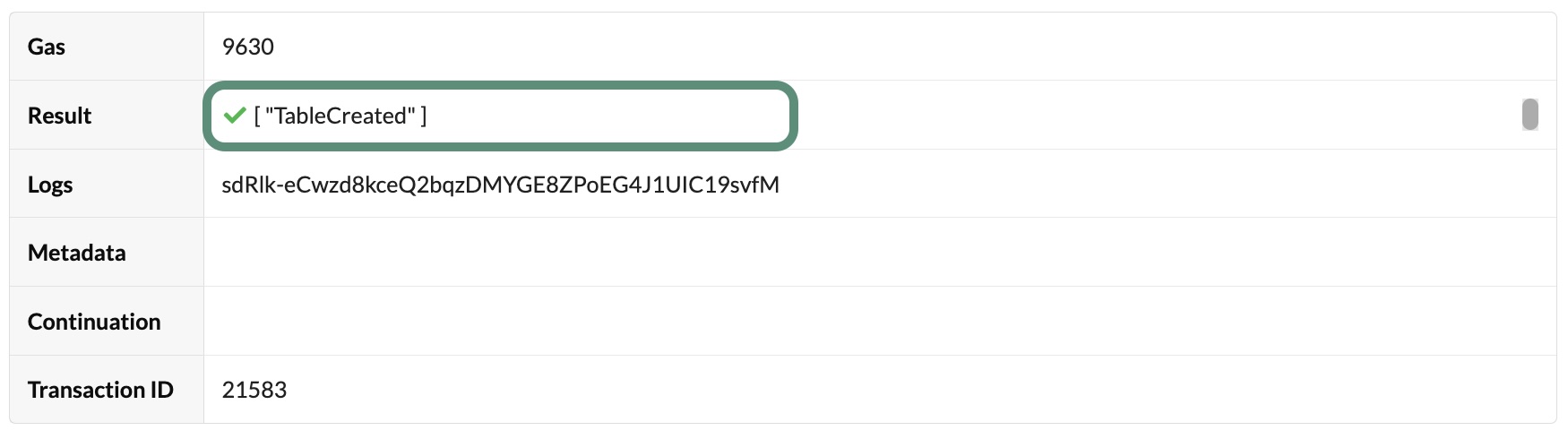
kadena tx sendcommand and following the prompts displayed.You can verify the transaction results using the request key for the transaction. If the transaction succeeded, you should see the TableCreated result in the transaction output.
Update the frontend
As you learned in Nominate candidates, the election application frontend is written in TypeScript and uses repositories to exchange data with the backend.
By default, the frontend uses the in-memory implementations of the repositories.
By making changes to the implementation of the interface IVoteRepository in the frontend/src/repositories/candidate/DevnetVoteRepository.ts file, you can configure the frontend to use the devnet backend instead of the in-memory backend.
After making these changes, you can use the frontend to cast votes on candidates listed in the candidates table and managed by the election module running on the development network.
To update the frontend to use the election module:
-
Open
election-workshop/frontend/src/repositories/candidate/DevnetVoteRepository.tsin your code editor. -
Update the values for the
CHAIN_IDandNAMESPACEconstants with the chain where you deployed theelectionmodule and your own principal namespace.const NETWORK_ID = 'development';
const CHAIN_ID = '3';
const API_HOST = `http://localhost:8080/chainweb/0.0/${NETWORK_ID}/chain/${CHAIN_ID}/pact`;
const NAMESPACE = 'n_d5ff15d933b83c1ef691dce3dabacfdfeaeade80'; -
Review the
hasAccountVotedfunction:const hasAccountVoted = async (account: string): Promise<boolean> => {
const transaction = Pact.builder
// @ts-ignore
.execution(Pact.modules[`${NAMESPACE}.election`]['account-voted'](account))
.setMeta({ chainId: CHAIN_ID })
.setNetworkId(NETWORK_ID)
.createTransaction();
const { result } = await client.dirtyRead(transaction);
if (result.status === 'success') {
return result.data.valueOf() as boolean;
} else {
console.log(result.error);
return false;
}
}; -
Remove the
@ts-ignorecomment from the function and notice the resulting errors. To fix the errors, you must generate types for your Pact module that can be picked up by@kadena/client. -
Open a terminal, change to the
election-workshop/frontenddirectory, then generate types for yourelectionmodule by running the following command:npm run pactjs:generate:contract:electionThis command uses the
pactjslibrary to generate the TypeScript definitions for the election contract and should clear the errors reported by the code editor. Depending on the code editor, you might need to close the project in the editor and reopen it to reload the code editor window with the change. -
Review the
votefunction, remove the@ts-ignorecomment, and save your changes to theDevnetVoteRepository.tsfile. -
In the terminal where
election-workshop/frontendis your current working directory, install the frontend dependencies by running the following command:npm install -
Start the frontend application configured to use the development network running locally by running the following command:
npm run start-devnet
Cast a vote
Now that you have deployed the election module on the development network and updated the frontend to use the election module backend, you can use the election website to cast votes.
To cast a vote using the election website:
-
Verify the development network is currently running on your local computer.
-
Open and unlock the Chainweaver desktop application and verify that:
- You're connected to development network from the network list.
- Your administrative account name with the k: prefix exists on the chain where you've deployed the
electionmodule. - Your administrative account name has funds on the chain where you've deployed the
electionmodule.
For simplicity, the frontend uses the
createSignWithChainweavermethod to sign the transaction that calls thevotefunction. The code for this call uses the default URL for the Chainweaver desktop application, 127.0.0.1:9467. To sign the transaction with the key you generated for the administrative account using kadena-cli, you can add your account to Chainweaver or replace the call to thecreateSignWithChainweavermethod withcreateSignWithKeypair. -
Open
http://localhost:5173in your browser, then click Set Account. -
Paste your administrative account, then click Set.
-
Click Add Candidate to add candidates, if necessary.
-
Click Vote Now for a candidate row.
-
Sign the transaction, and wait for the transaction to finish.
-
Verify that the number of votes for the candidate you voted for increased by one vote.
After you vote, the Vote Now button is disabled because the frontend checks if your account has already voted by making a
localrequest to theaccount-votedfunction of theelectionPact module.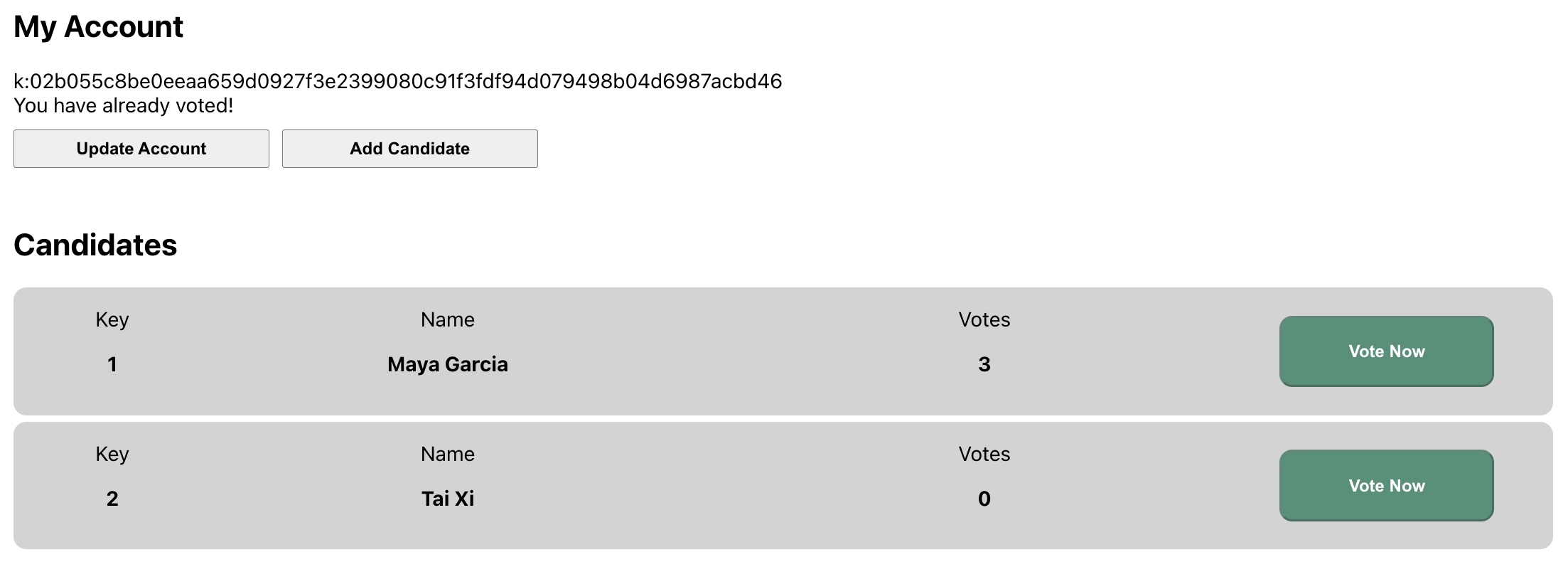
Next steps
In this tutorial, you learned how to:
- Organize test cases into separate REPL files.
- Modify the
votefunction iteratively using test cases and expected results. - Use the
with-default-readfunction. - Add a
votesdatabase table to store the vote cast by each account holder. - Connect the voting functionality from the frontend to the development network as a backend.
With this tutorial, you completed the functional requirements for the election Pact module, deployed the module on your local development network, and interacted with the blockchain backend through the frontend of the election application website.
However, you might have noticed that your administrative account had to pay for gas to cast a vote.
To make the election accessible, account holders should be able to cast a vote without having to pay transaction fees.
The next tutorial demonstrates how to add a gas station module to the election smart contract.
With this module, an election organization can act as the owner of an account that provides funds to pay the transaction fees on behalf of election voters.
By using a gas station, voters can cast votes without incurring any transaction fees.
To see the code for the activity you completed in this tutorial and get the starter code for the next tutorial, check out the 09-gas-station branch from the election-workshop repository by running the following command in your terminal shell:
git checkout 09-gas-station