Simple payments
The Simple payments project is designed to help you build a simple contract that transfers value between two accounts. Because a blockchain acts as a digital ledger, transferring value between accounts is one of the most common blockchain operations. Knowing how to create a smart contract that can securely transfer assets is one of the most important building blocks that will enable you to create more complex applications.
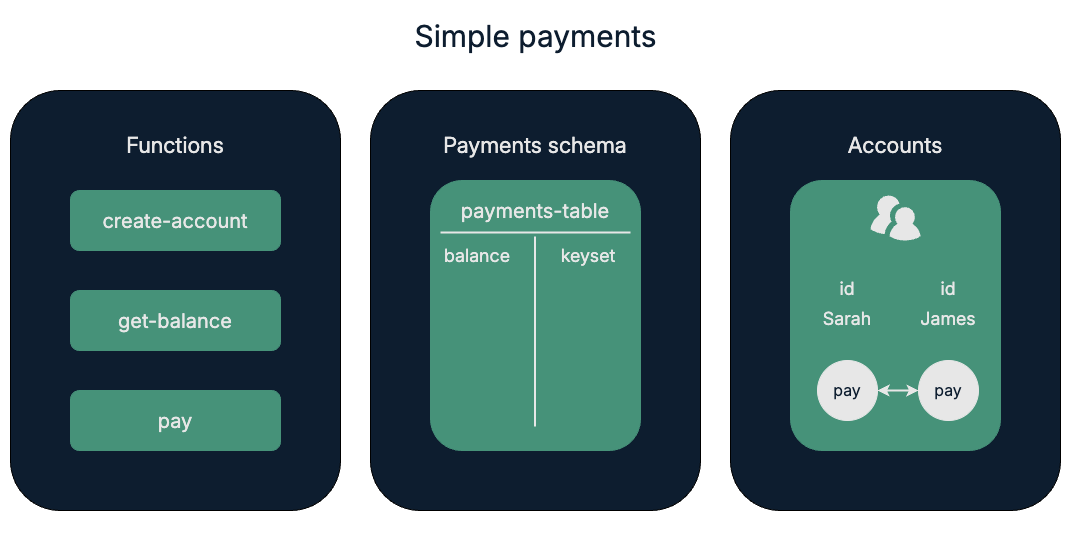
For this project, you'll create one Pact payments module smart contract that consists of three functions:
create-accountget-balancepay
These functions store information in a payments-table database table.
The payments-table manages payments between two test accounts named Sarah and James.
Before you begin
Before starting this project, verify your environment meets the following basic requirements:
- You have a GitHub account and can run
gitcommands. - You have installed the Pact programming language and command-line interpreter.
- You have installed the
kadena-clipackage and have a working directory with initial configuration settings. - You have a local development node that you can connect to that runs the
chainweb-nodeprogram, either in a Docker container or on a physical or virtual computer. - You must have at least one account that's funded with KDA on at least one chain for deployment on the local development network or the Kadena test network.
- You should be familiar with the basics for defining modules and using keysets.
Get the starter code
To get started:
-
Open a terminal shell on your computer.
-
Clone the
pact-coding-projectsrepository by running the following command:git clone https://github.com/kadena-docs/pact-coding-projects.git -
Change to the
01-simple-paymentdirectory by running the following command:cd pact-coding-projects/01-simple-paymentIf you list the contents of this directory, you'll see the following files:
starter-simple-payment.pactprovides a starting point with the framework for the project code and comments for every challenge.simple-payment.pactcontains the final solution code that can be deployed.test-simple-payment.replprovides a simplified example of a test file that illustrates using REPL-only functions for testing contracts locally.simple-payment.replprovides a complete test file for testing the finalsimple-payment.pactcontract.
-
Open and review the
starter-simple-payment.pactfile.This file describes all of the tasks that you need to complete for the Simple payments coding project. You can follow the instructions embedded in the file to try to tackle this coding project on your own without looking at the solutions to each step, or follow the instructions in the next sections if you need additional guidance.
Define a namespace, keyset, and module
The module declaration is a core part of any Pact smart contract. To define a module, you must also specify the administrative keyset or governance capability that owns the module.
For local development, you can define a module without using the context of a namespace. However, if you want to deploy modules, you should learn how to work with namespaces and namespace keysets.
For this coding project, you'll define a custom namespace to serve as context for one Pact module—the payments module—and the administrative keyset to use in the namespace as the owner of the payments module.
To start the module declaration:
-
Open the
starter-simple-payment.pactfile in your code editor and save it assimple-payment.pact. -
Define a custom local namespace that can only be controlled and accessed by the
admin-keysetyou define.(define-namespace "dev" (read-keyset "admin-keyset") (read-keyset "admin-keyset")) -
Set the namespace you defined to be the active namespace.
(namespace "dev") -
Define namespace administrative keyset by reading the
admin-keyset.(define-keyset "dev.admin-keyset" (read-keyset "admin-keyset"))In essence, this line creates an administrative keyset by reading the
admin-keysetdata—one or more public keys and a predicate function—from a message payload or passed in as environment data. Theadmin-keysetdata looks similar to the following:{"admin-keyset":{ "keys": ["fe4b6da332193cce4d3bd1ebdc716a0e4c3954f265c5fddd6574518827f608b7"], "pred": "keys-all" } }Note that you can use the standard string notation with double quotation marks(
"admin-keyset") or symbol notation with a single quotation mark ('admin-keyset) for identifiers. For more information about string literals used as identifiers, see Symbols. -
Create a module named
paymentsthat is governed by thedev.admin-keyset.(module payments "dev.admin-keyset"
;; Module declaration
) -
Save your changes.
Now that you have a module, you need to add the code for this module inside of the
paymentsdeclaration—that is, before the closing parenthesis that marks the end of the module declaration.For more information about defining modules, see Modules and references and the description of the module keyword.
Define a schema and table
The payments module stores information about accounts and balances in the payments-table database table.
This table keeps track of the balance of the accounts that are associated with the Sarah and James account keysets.
The schema for the payments-table looks like this:
| Field name | Field type |
|---|---|
| balance | decimal |
| keyset | guard |
To define the schema and table:
-
Open the modified
simple-payment.pactfile in your code editor. -
Define a
paymentsschema for a table with the columnsbalanceas type decimal andkeysetas type guard.(defschema payments
balance:decimal
keyset:guard)It's worth noting that the row key for the table isn't defined in the schema for the table.
-
Define the
payments-tableto use the{payments}schema you created in the previous step.(deftable payments-table:{payments}) -
Move the closing parenthesis that marks the end of the
paymentsmodule declaration after the table definition to include the schema and table definitions inside of the module.Without comments, your code should look similar to the following:
(define-namespace "dev" (read-keyset "admin-keyset") (read-keyset "admin-keyset"))
(namespace "dev")
(define-keyset "dev.admin-keyset" (read-keyset "admin-keyset"))
(module payments "dev.admin-keyset"
  (defschema payments
     balance:decimal
     keyset:guard)
(deftable payments-table:{payments})
) -
Save your changes.
You now have a schema and table definition inside of the
paymentsdeclaration.For more information about defining schemas and tables, see Database model.
Define functions
For this coding project, the payments module provides three functions:
create-accountto allow the module administrator to create accounts.get-balanceto allow the module administrator and account owner to view account balances.payto allow one account to pay another account.
Define the create-account function
The create-account function allows the payments module administrator—identified by the dev.admin-keyset keyset—to create any number of accounts.
To define the create-account function:
-
Open the modified
simple-payment.pactfile in your code editor. -
Start the
create-accountfunction definition with the keyworddefunand add the parametersid,initial-balance, andkeyset.(defun create-account:string (id:string initial-balance:decimal keyset:guard)
) -
Within the function, use
enforce-guardto ensure that all accounts are created by thedev.admin-keysetadministrator.(enforce-guard "dev.admin-keyset") -
Within the function, use
enforceto ensure theinitial-balanceis greater than or equal to zero and include an optional documentation string.(enforce (>= initial-balance 0.0) "Initial balances must be >= 0.") -
Within the function, insert the
initial-balanceandkeysetinto thepayments-tableusing theidparameter to set the key-row value.(insert payments-table id
{ "balance": initial-balance,
"keyset": keyset }) -
Check that the closing parenthesis for the
create-accountfunction is after the last expression and move the closing parenthesis for thepaymentsmodule declaration after the function.Without comments, your code should look similar to the following:
(define-namespace "dev" (read-keyset "admin-keyset") (read-keyset "admin-keyset"))
(namespace "dev")
(define-keyset "dev.admin-keyset" (read-keyset "admin-keyset"))
(module payments "dev.admin-keyset"
(defschema payments
balance:decimal
keyset:guard)
(deftable payments-table:{payments})
(defun create-account:string (id:string initial-balance:decimal keyset:guard)
(enforce-guard "dev.admin-keyset")
(enforce (>= initial-balance 0.0) "Initial balances must be >= 0.")
  (insert payments-table id
         { "balance": initial-balance,
           "keyset": keyset })
)
)
Define the get-balance function
Now that you can create accounts, it is helpful to be able to view the balance of these accounts.
The get-balance function allows account owners and the module administrator to view account balances.
To define the get-balance function:
-
Start the
get-balancefunction definition with the keyworddefunand the required argument to be theidkey-row value.(defun get-balance (id:string)
) -
Within the function, use
with-readto view theidfrom thepayments-table.(with-read payments-table id -
Within the function, use
enforce-oneto check that the keyset calling the function is either thedev.admin-keysetor theidkeyset.(enforce-one "Access denied"
[(enforce-guard keyset)
(enforce-guard "dev.admin-keyset")]) -
Within the function, return the
balancefor the specifiedidkeyset.balance) -
Check that the closing parenthesis for the
get-balancefunction is after the last expression and move the closing parenthesis for thepaymentsmodule declaration after the function.Without comments, your code should look similar to the following:
(define-namespace "dev" (read-keyset "admin-keyset") (read-keyset "admin-keyset"))
(namespace "dev")
(define-keyset "dev.admin-keyset" (read-keyset "admin-keyset"))
(module payments "dev.admin-keyset"
(defschema payments
balance:decimal
keyset:guard)
(deftable payments-table:{payments})
(defun create-account:string (id:string initial-balance:decimal keyset:guard)
(enforce-guard "dev.admin-keyset")
(enforce (>= initial-balance 0.0) "Initial balances must be >= 0.")
(insert payments-table id
{ "balance": initial-balance,
"keyset": keyset })
)
(defun get-balance:decimal (id:string)
(with-read payments-table id
{ "balance":= balance, "keyset":= keyset }
     (enforce-one "Access denied"
       [(enforce-guard keyset)
        (enforce-guard "dev.admin-keyset")])
balance)
)
)
Define the pay function
The pay function allows one account to transfer assets to another account defined in the payments-table.
To define the pay function:
-
Start the
payfunction definition with the keyworddefunand specify the parameters asfrom,to, andamount.(defun pay:string (from:string to:string amount:decimal)
) -
Within the function, use
with-readto view thepayments-tablefor thefromaccount and bind thebalanceandkeysetof this account to thefrom-balandkeysetvariables.(with-read payments-table from { "balance":= from-bal, "keyset":= keyset } -
Within the function, enforce that the
keysetis the keyset of the account.(enforce-guard keyset) -
Within the function, use
with-readto get the balance of thetoaccount, and bind this balance to theto-balvariable.(with-read payments-table to { "balance":= to-bal } -
Within the function, enforce that the amount being transferred is greater than zero or return an error message.
(enforce (> amount 0.0) "Negative transaction amount") -
Within the function, enforce that
balancefor thefromaccount is greater than what is being transferred or return an error message.(enforce (>= from-bal amount) "Insufficient funds") -
Within the function, update the
payments-tableto reflect the new balance for thefromaccount.(update payments-table from
{ "balance": (- from-bal amount) }) -
Within the function, update the
payments-tableto reflect the new balance for thetoaccount.(update payments-table to
{ "balance": (+ to-bal amount) }) -
Within the function, return a formatted string to say that the
fromaccount has paid thetoaccount and theamountpaid.(format "{} paid {} {}" [from to amount]))) -
Check that the closing parenthesis for the
payfunction is after the last expression and move the closing parenthesis for thepaymentsmodule declaration after the function.Without comments, your code should look similar to the following:
(define-namespace "dev" (read-keyset "admin-keyset") (read-keyset "admin-keyset"))
(namespace "dev")
(define-keyset "dev.admin-keyset" (read-keyset "admin-keyset"))
(module payments "dev.admin-keyset"
(defschema payments
balance:decimal
keyset:guard)
(deftable payments-table:{payments})
(defun create-account:string (id:string initial-balance:decimal keyset:guard)
(enforce-guard "dev.admin-keyset")
(enforce (>= initial-balance 0.0) "Initial balances must be >= 0.")
(insert payments-table id
{ "balance": initial-balance,
"keyset": keyset })
)
(defun get-balance:decimal (id:string)
(with-read payments-table id
{ "balance":= balance, "keyset":= keyset }
(enforce-one "Access denied"
[(enforce-guard keyset)
(enforce-guard "dev.admin-keyset")])
balance)
)
(defun pay:string (from:string to:string amount:decimal)
(with-read payments-table from { "balance":= from-bal, "keyset":= keyset }
(enforce-guard keyset)
(with-read payments-table to { "balance":= to-bal }
(enforce (> amount 0.0) "Negative transaction amount")
(enforce (>= from-bal amount) "Insufficient funds")
     (update payments-table from
        { "balance": (- from-bal amount) })
     (update payments-table to
        { "balance": (+ to-bal amount) })
(format "{} paid {} {}" [from to amount])
)
)
)
) -
Save your changes.
The
payfunction is the last code that you need to include within thepaymentsmodule.
Create the table
Although you defined a schema and a table inside of the payments module, tables are created outside of the module code.
This distinction between what you define inside of the module and outside of the module is important because the module acts as a guard to protect access to database functions and database records.
This separation also allows module code to be potentially updated without replacing the table in Pact state.
To create the table:
-
Open the modified
simple-payment.pactfile in your code editor. -
Locate the closing parenthesis for the
paymentsmodule. -
Create the table using the
create-tablekeyword.(create-table payments-table)
Create a file for local testing
At this point, you have completed all of the essential code for the simple-payment.pact contract.
However, you can't test or deploy the code in its current state.
Because keysets are defined outside of contract code, the most common way to test a module locally is to create a test file that makes use of REPL-only built-in functions to simulate data that must be provided by the environment, like keysets and signatures.
In this part of the project, you'll see how to create a test file—the simple-payment.repl file—to call REPL-only functions to test the functions you've defined in the payments module.
To create the test file:
-
Copy the
simple-payment.pactfile and rename the file astest-simple-payment.repl. -
Open the
test-simple-payment.replfile in your code editor. -
Add the
env-databuilt-in function to set environment data to simulate keyset information.;; Set keyset information
(env-data
{ "admin-keyset" :
{ 'keys : [ 'admin-public-key ]
, 'pred : 'keys-all
}
}
) -
Add the
env-sigsbuilt-in function to set the key for signing transactions in your environment.;; Add a signature for signing transactions
(env-sigs
[{ 'key : 'admin-public-key
, 'caps : []
}]
) -
Add a transaction using the
begin-txandcommit-txbuilt-in functions to define a namespace and keyset for your module.(begin-tx "Define a namespace and keyset")
(define-namespace "dev" (read-keyset "admin-keyset") (read-keyset "admin-keyset"))
(namespace "dev")
(expect
"A keyset can be defined"
"Keyset write success"
(define-keyset "dev.admin-keyset" (read-keyset "admin-keyset")))
(commit-tx)Namespaces are required to define a context for modules when they are deployed on a network.
This example also uses the
expectbuilt-in function to test the assertion that the keyset can be defined. -
Add the
begin-txfunction before the module declaration, ans scroll to the bottom of the file and add the closingcommit-txfunction.(begin-tx "Crete module")
(module payments "dev.admin-keyset"
(defschema payments
balance:decimal
keyset:guard)
(deftable payments-table:{payments})
(defun create-account:string (id:string initial-balance:decimal keyset:guard)
(enforce-guard "dev.admin-keyset")
(enforce (>= initial-balance 0.0) "Initial balances must be >= 0.")
(insert payments-table id
{ "balance": initial-balance,
"keyset": keyset })
)
(defun get-balance:decimal (id:string)
(with-read payments-table id
{ "balance":= balance, "keyset":= keyset }
(enforce-one "Access denied"
[(enforce-guard keyset)
(enforce-guard "dev.admin-keyset")])
balance)
)
(defun pay:string (from:string to:string amount:decimal)
(with-read payments-table from { "balance":= from-bal, "keyset":= keyset }
(enforce-guard keyset)
(with-read payments-table to { "balance":= to-bal }
(enforce (> amount 0.0) "Negative transaction amount")
(enforce (>= from-bal amount) "Insufficient funds")
(update payments-table from
{ "balance": (- from-bal amount) })
(update payments-table to
{ "balance": (+ to-bal amount) })
(format "{} paid {} {}" [from to amount])
)
)
)
)
(create-table payments-table)
(commit-tx) -
Add a transaction for testing that only the administrator can create accounts.
(begin-tx "Test creating account")
;; Call the payments module into scope for this transaction.
  (use payments)
  ;; Clear keys from the environment.
  (env-keys [""])
  ;; Define the keysets for Sarah and James.
  (env-data {
    "sarah-keyset": {"keys": ["sarah-key"]},
    "james-keyset": {"keys": ["james-key"]}})

  ;; Try creating the Sarah account without the admin keyset defined.
  (expect-failure "Admin Keyset is missing" "Keyset failure (keys-all): [admin-pu...]" (create-account "Sarah" 100.25 (read-keyset "sarah-keyset")))

  (env-keys ["admin-public-key"])

  ;; Create the Sarah account the proper admin keyset defined.
   (expect "Admin Keyset is present" "Write succeeded" (create-account "Sarah" 100.25 (read-keyset "sarah-keyset")))

   ;; Create the James account with initial value of 250.0.
   (create-account "James" 250.0 (read-keyset "james-keyset"))

(commit-tx) -
Add a transaction for testing that one account can pay another account.
(begin-tx "Test making a payment")
  (use payments)
  (env-keys ["sarah-key"])
  (pay "Sarah" "James" 25.0)
(commit-tx) -
Add a transaction for testing that an account owner can view the account balance.
(begin-tx "Test reading balances")
  (use payments)
  (env-keys ["sarah-key"])
  ;; Read Sarah's balance as Sarah.
  (format "Sarah's balance is {}" [(get-balance "Sarah")])

  (env-keys ["james-key"])
  ;; Read James' balance as James.
  (format "James's balance is {}" [(get-balance "James")])
(commit-tx) -
Open a terminal shell on your computer and test execution by running the following command:
pact test-simple-payment.repl --traceYou should see output similar to the following:
test-simple-payment.repl:1:0-7:1:Trace: "Setting transaction data"
test-simple-payment.repl:9:0-13:1:Trace: "Setting transaction signatures/caps"
test-simple-payment.repl:15:0-15:42:Trace: "Begin Tx 0 Define a namespace and keyset"
test-simple-payment.repl:17:2-17:84:Trace: "Namespace defined: dev"
test-simple-payment.repl:18:2-18:19:Trace: "Namespace set to dev"
test-simple-payment.repl:19:2-22:68:Trace: "Expect: success A keyset can be defined"
test-simple-payment.repl:23:0-23:11:Trace: "Commit Tx 0 Define a namespace and keyset"
test-simple-payment.repl:25:0-25:25:Trace: "Begin Tx 1 Crete module"
test-simple-payment.repl:26:2-65:3:Trace: Loaded module payments, hash Y5S8S1dbBPRER7kbAWxXnowfOjQ7pwPywwwmIidAPTE
test-simple-payment.repl:66:0-66:29:Trace: "TableCreated"
test-simple-payment.repl:67:0-67:11:Trace: "Commit Tx 1 Crete module"
test-simple-payment.repl:69:0-69:34:Trace: "Begin Tx 2 Test creating account"
test-simple-payment.repl:71:2-71:16:Trace: Loaded imports from payments
test-simple-payment.repl:73:2-73:17:Trace: "Setting transaction keys"
test-simple-payment.repl:75:2-77:45:Trace: "Setting transaction data"
test-simple-payment.repl:80:0-80:146:Trace: "Expect failure: Success: Admin Keyset is missing"
test-simple-payment.repl:82:0-82:31:Trace: "Setting transaction keys"
test-simple-payment.repl:85:0-85:113:Trace: "Expect: success Admin Keyset is present"
test-simple-payment.repl:88:0-88:59:Trace: "Write succeeded"
test-simple-payment.repl:90:0-90:11:Trace: "Commit Tx 2 Test creating account"
test-simple-payment.repl:92:0-92:34:Trace: "Begin Tx 3 Test making a payment"
test-simple-payment.repl:93:2-93:16:Trace: Loaded imports from payments
test-simple-payment.repl:94:2-94:26:Trace: "Setting transaction keys"
test-simple-payment.repl:95:2-95:28:Trace: "Sarah paid James 25.0"
test-simple-payment.repl:96:0-96:11:Trace: "Commit Tx 3 Test making a payment"
test-simple-payment.repl:98:0-98:34:Trace: "Begin Tx 4 Test reading balances"
test-simple-payment.repl:99:2-99:16:Trace: Loaded imports from payments
test-simple-payment.repl:100:2-100:26:Trace: "Setting transaction keys"
test-simple-payment.repl:102:2-102:58:Trace: "Sarah's balance is 75.25"
test-simple-payment.repl:104:2-104:26:Trace: "Setting transaction keys"
test-simple-payment.repl:106:2-106:58:Trace: "James's balance is 275.0"
test-simple-payment.repl:107:0-107:11:Trace: "Commit Tx 4 Test reading balances"
Load successful
This sample test file demonstrates adding REPL built-in functions around the Pact code. A more common approach to testing Pact modules involves separating environment data into an
init.replfile and then loading theinit.replfile and the Pact.pactmodule file for more streamlined testing. For examples of other ways to test thesimple-payment.pactmodule, see:simple-payment.repldemonstrates loading a Pact module to test its functions rather than including the module in the.replfile.- init.repl demonstrates creating a separate
.replfile for setting up environment data outside of the module. - use-init-simple-payment.repl demonstrates a
.replfile that uses theinit.replfile.
Deploy the contract
After testing the contract using the Pact interpreter and the REPL file, you can deploy the contract on your local development network or the Kadena test network.
However, you must deploy to an existing namespace—such as the free namespace—or a registered principal namespace to deploy on any Kadena network.
If you want to deploy in an existing namespace, you must also ensure that your module name and keyset name are unique across all of the modules that exist in that namespace.
Prepare to deploy
To deploy to the free namespace:
-
Remove the
define-namespacefunction. -
Replace all occurrences of the custom
"dev"namespace with"free". -
Modify the module and keyset names to make them unique in the
freenamespace.(namespace "free")
(define-keyset "free.pistolas-project" (read-keyset "pistolas-project"))
(module pistolas-payments "free.pistolas-project" ...)
To deploy to a private namespace:
- Modify the
define-namespacefunction to use thens.create-principal-namespacefunction to define a unique principal namespace for your public key. - Replace all occurrences of the custom
"dev"namespace with a principal namespace similar to the following"n_1cc1f83c56f53b8865cc23a61e36d4b17e73ce9e".
In general, the best practice is to create a principal namespace for all of your modules and keysets.
Verify network, chain, and account information
Before you deploy on the local development network, verify the following:
-
The development network is currently running on your local computer.
-
You have at least one account with funds on at least one chain in the development network.
If you don't have keys and at least one account on any chain on the network, you need to generate keys, create an account, and fund the account on at least one chain before continuing.
-
You have the public key for the account on the chain where you have funds.
Create a principal namespace
For this coding project, you can define a principal namespace by executing a transaction using the following simple-define-namespace.ktpl transaction template.
code: |-
  (define-namespace (ns.create-principal-namespace (read-keyset "k")) (read-keyset "k") (read-keyset "k"))
data:
  {
    "k": [
        "{{public-key}}"
    ]
  }
meta:
  chainId: "{{chain-id}}"
  sender: "{{{sender-account}}}"
  gasLimit: 80300
  gasPrice: 0.000001
  ttl: 600
signers:
  - public: "{{public-key}}"
    caps:
      - name: "coin.GAS"
        args: []
networkId: "{{network-id}}"
You can use kadena tx add to replace the variables in the template with the values for your public key, sender account, chain, and network.
For example:
? Which template do you want to use: simple-define-namespace.ktpl
? File path of data to use for template .json or .yaml (optional):
? Template value public-key:
a6731ce787ece3941fcf28ce6ccf58150b55a23310e242f4bcb0498c93119689
? Template value chain-id: 3
? Template value sender-account:
k:a6731ce787ece3941fcf28ce6ccf58150b55a23310e242f4bcb0498c93119689
? Template value network-id: development
? Where do you want to save the output: myNamespace
After you save the transaction to a file, you can use kadena tx sign to sign the transaction with your wallet password or public and secret keys.
After signing the transaction, you can use kadena tx send to send the transaction to the blockchain network.
After the transaction is complete, copy the principal namespace from the transaction results and use it to replace all occurrences of the original "dev" namespace.
(namespace "n_1cc1f83c56f53b8865cc23a61e36d4b17e73ce9e")
(define-keyset "n_1cc1f83c56f53b8865cc23a61e36d4b17e73ce9e.admin-keyset" (read-keyset "admin-keyset"))
(module payments "n_1cc1f83c56f53b8865cc23a61e36d4b17e73ce9e.admin-keyset" ...)
Create a deployment transaction
You can deploy the simple-payment.pact module on the local development network using the same workflow of kadena tx add, sign, and send commands that you used to execute the define-namespace transaction.
To deploy the module:
-
Create a new transaction template named
simple-payment.ktplin the~/.kadena/transaction-templatesfolder.cd ~/.kadena/transaction-templates
touch simple-payment.ktpl -
Open the
simple-payment.ktplfile in a code editor and create a reusable transaction request in YAML format similar to the following to specify the path to thesimple-payment.pactfile that contains your Pact module code.codeFile: "../../simple-payment.pact"
data:
admin-keyset:
keys: ["{{public-key}}"]
pred: "keys-all"
meta:
chainId: "{{chain-id}}"
sender: "{{{sender-account}}}"
gasLimit: 80300
gasPrice: 0.000001
ttl: 600
signers:
- public: "{{public-key}}"
caps: []
networkId: "{{network-id}}" -
Create a transaction that uses the template by running the
kadena tx addcommand and following the prompts displayed.For example:
? Which template do you want to use: simple-payment.ktpl
? File path of data to use for template .json or .yaml (optional):
? Template value public-key: a6731ce7...93119689
? Template value chain-id: 3
? Template value sender-account: k:a6731ce7...93119689
? Template value network-id: development
? Where do you want to save the output: deploy-simple-payment
In this example, the unsigned transaction is saved in a
deploy-simple-payment.jsonfile. -
Sign the transaction by running the
kadena tx signcommand and following the prompts displayed to sign with a wallet account or a public and secret key pair.For example:
? Select an action: Sign with wallet
? Select a transaction file: Transaction: deploy-simple-payment.json
? 1 wallets found containing the keys for signing this transaction, please select a wallet to sign this transaction with first: Wallet: pistolas
? Enter the wallet password: ******** -
Send the transaction by running the
kadena tx sendcommand and following the prompts displayed.After the transaction is complete, you should see the message
TableCreatedin the transaction results.
Create additional transactions
After you deploy the module, you can create additional transactions to verify contract functions running on the development network.
For example, you can create a transaction template for the payments.create-account function similar to the following:
code: |-
   (n_1cc1f83c56f53b8865cc23a61e36d4b17e73ce9e.payments.create-account "{{{new-account-name}}}" {{balance}} (read-keyset "account-guard"))
data:
   account-guard:
      keys:
      - {{{publicKey}}}
      pred: "keys-all"
meta:
   chainId: "{{chain-id}}"
   sender: "k:a6731ce787ece3941fcf28ce6ccf58150b55a23310e242f4bcb0498c93119689"
   gasLimit: 2000
   gasPrice: 0.00000001
   ttl: 7200
signers:
   - public: "a6731ce787ece3941fcf28ce6ccf58150b55a23310e242f4bcb0498c93119689"
      caps: []
networkId: "{{network:networkId}}"
type: exec
With this template, you can create an account for Sarah with an initial balance of 100.25 and an account for James with an initial balance of 250.0, equivalent to executing calls like the following in the Pact REPL:
(dev.payments.create-account "Sarah" 100.25 (read-keyset "sarah-keyset"))
"Write succeeded"

(dev.payments.create-account "James" 250.0 (read-keyset "james-keyset"))
"Write succeeded"
You can also create transaction templates for the pay and get-balance functions.
For example, you can create a transaction for the pay function with a template similar to the following:
code: |-
  (n_1cc1f83c56f53b8865cc23a61e36d4b17e73ce9e.payments.pay "{{sender-id}}" "{{receiver-id}}" {{amount}})
data:
meta:
  chainId: "{{chain-id}}"
  sender: "{{sender-k-account}}"
  gasLimit: 2000
  gasPrice: 0.00000001
  ttl: 7200
signers:
  - public: "{{sender-publicKey}}"
    caps: []
networkId: "{{network:networkId}}"
type: exec
With this template, you can create an transaction for Sarah to pay James 25.0, equivalent to executing the following call in the Pact REPL:
(dev.payments.pay "Sarah" "James" 25.0)
"Sarah paid James 25.0"
However, this transaction requires the account associated with Sarah to have an account and funds to pay for the transaction on the chain you specify. The account must also be associated with a wallet that you've created or imported into the Kadena CLI local development environment.
Similarly, you can create a transaction for the get-balance function with a template similar to the following:
code: |-
  (format "Sarah's balance is {}" [(n_1cc1f83c56f53b8865cc23a61e36d4b17e73ce9e.payments.get-balance "{{simple-payments-id}}")])
data:
meta:
  chainId: "{{chain-id}}"
  sender: "{{sender-k-account}}"
  gasLimit: 2000
  gasPrice: 0.00000001
  ttl: 7200
signers:
  - public: "{{sender-publicKey}}"
    caps: []
networkId: "{{network:networkId}}"
type: exec
With this template, you can create separate transactions for getting the balance for Sarah and getting the balance for James, equivalent to executing the following calls in the Pact REPL:
(format "Sarah's balance is {}" [(dev.payments.get-balance "Sarah")])
"Sarah's balance is 75.25"

(format "James's balance is {}" [(dev.payments.get-balance "James")])
"James's balance is 275.0"
Next steps
Congratulations, you've just completed the Simple payments coding project. You'll see similar patterns in other coding projects, with each project introducing new features, Pact syntax, or alternative coding models. The coding projects are also intended to complement and reinforce concepts and examples presented in other parts of the documentation. Follow the links embedded in each project to learn more.